UPDATE: replaced all the images – sorry about them being broken after moving to a new server. They’re clickable now for an enlarged view.
UPDATE (2014-01-05): came across an original D70s repair manual with highly detailed disassembly instructions, part numbers, etc. You can download it here as a PDF. Seems to be a safe download, but the usual precautions about content from unknown sites apply.
My D70s recently developed the dreaded CHA error, refusing to recognize any perfectly fine CF cards. A closer inspection revealed that one of the pins was pushed back… straightening a bent pin is fairly easy with the right set of SMD tweezers and a little patience, but if it is pushed back things become more difficult, effectively requiring a little disassembly.
Please keep in mind that the following instructions WILL VOID YOUR WARRANTY. Only attempt this if you are comfortable with working on fragile parts, have a lot of patience and the right tools. Do not lose any parts. The screws are NOT all identical, so arrange your workplace to make sure you know EXACTLY which part belongs where.
Tools required:
- tweezers (the smaller the better, I like my straight-tip SMD tweezers although the shap tip isn’t really perfect)
- PH00 tip screwdriver
- good light
- patience
Unfortunately, I can’t help with any part numbers, but the comments indicate that they are usually available at Nikon service facilities (where an informal description should suffice to get the right part).
Step 0: Preparations
Make sure you have a clean work space. This is not the right time to be drinking Coke or eating chips. Make sure you remove the battery. Remove the lens and put the protective cap in place.
Step 1: Back panel removal
The back panel is held in place by four screws on the left and right side of the camera body. Remove them all and set them aside.
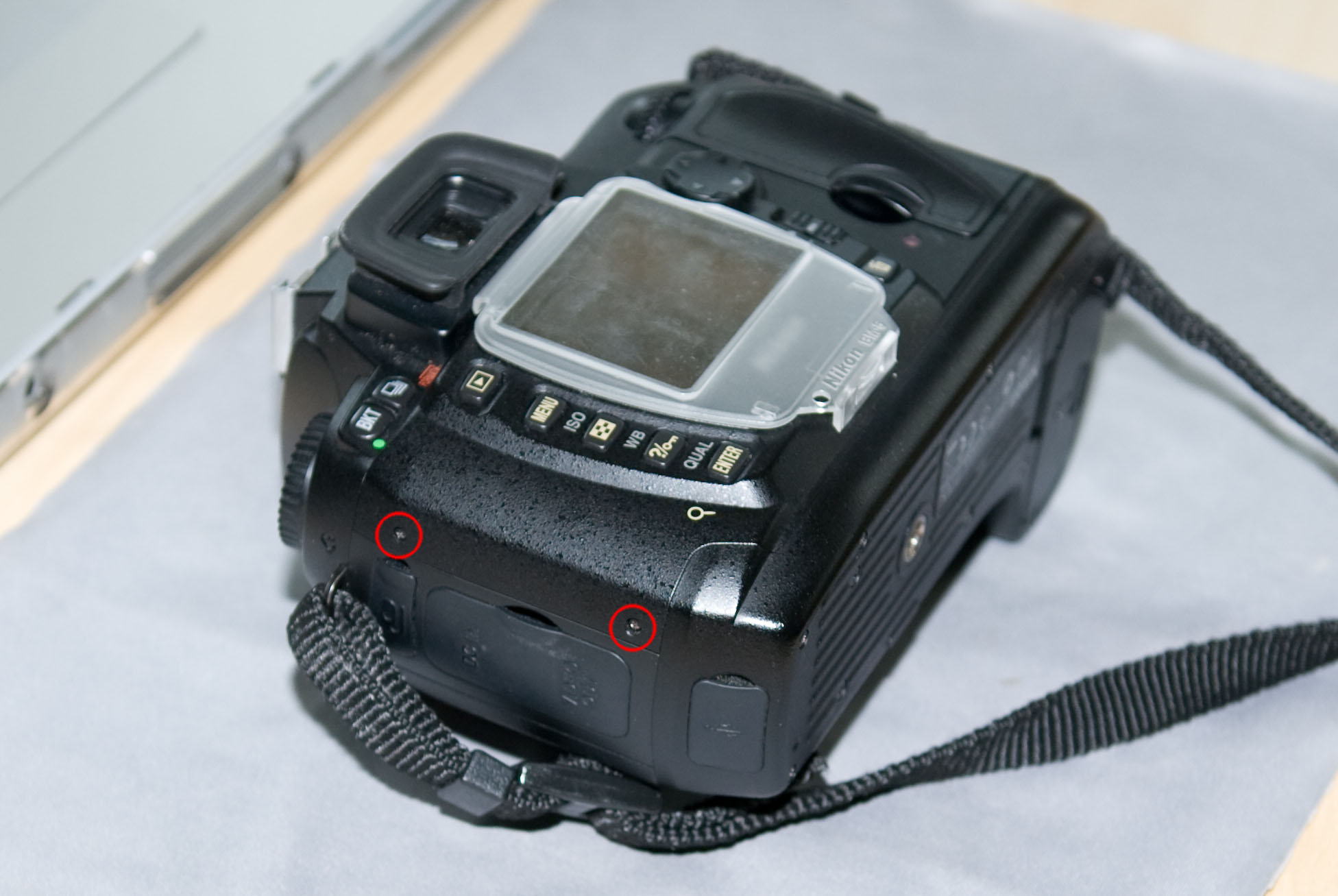
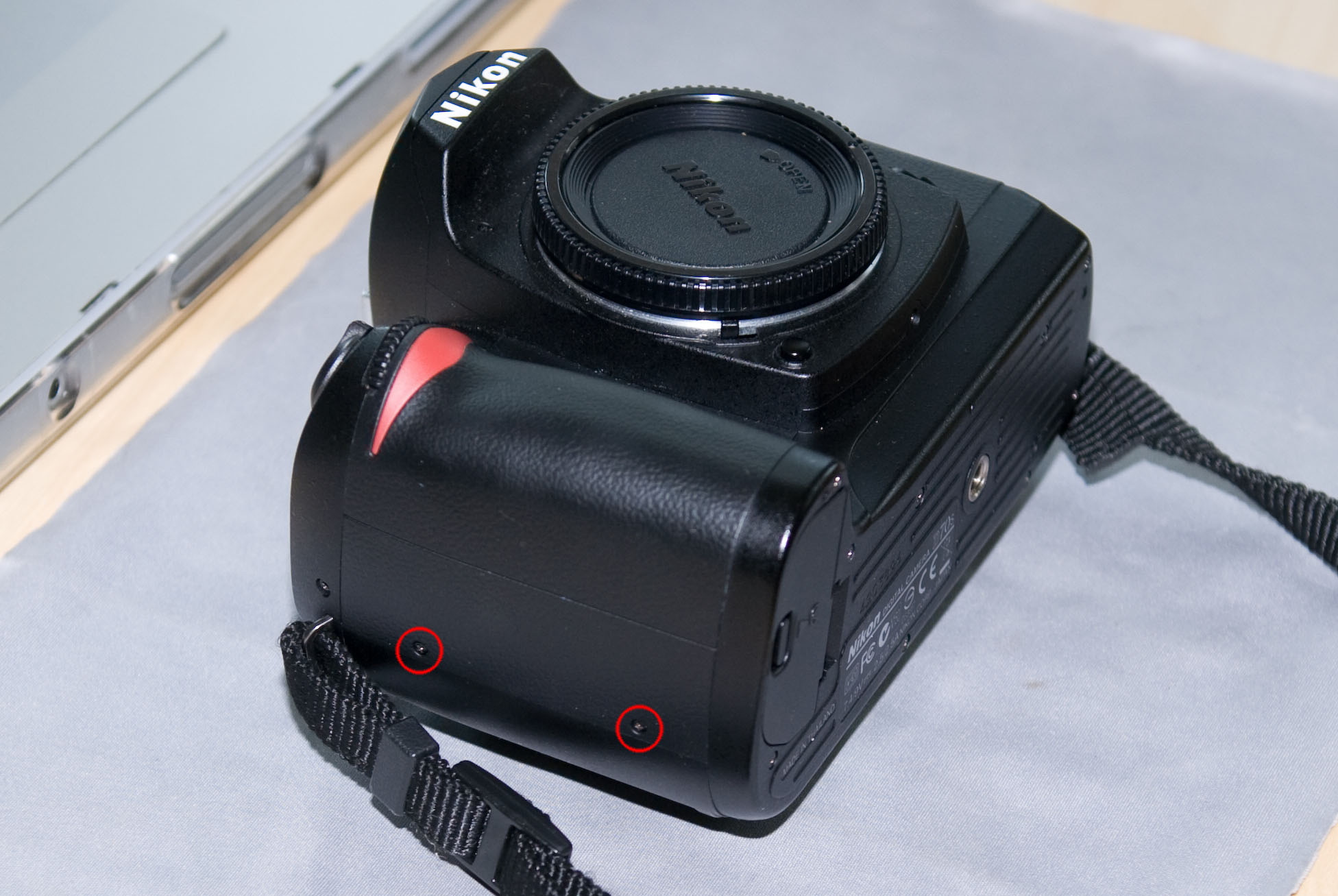
Now, gently lift off the back panel. I used the CF cover flap to pull on one side. Be careful, there is one connecting ribbon cable on the bottom that you do not want to damage.
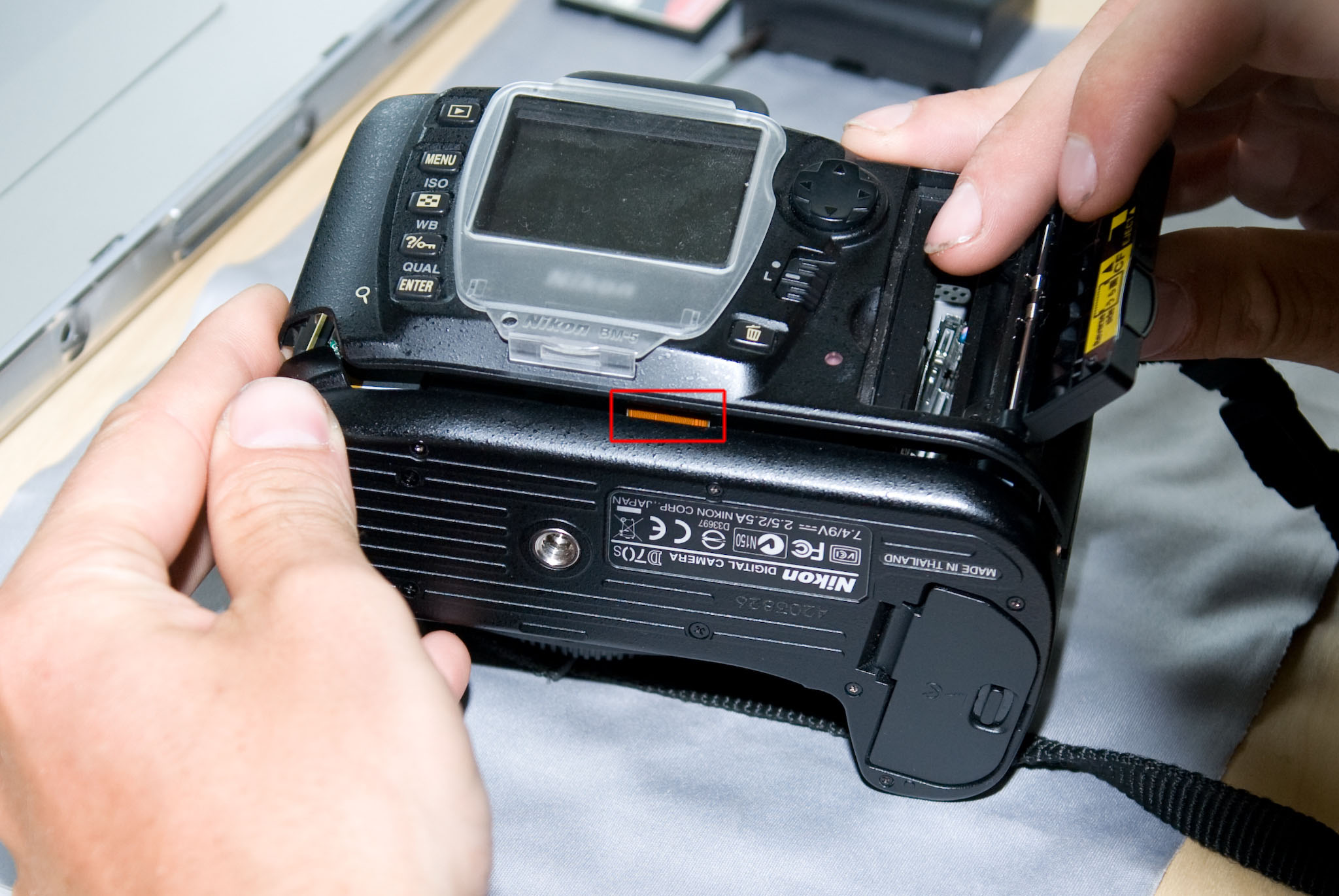
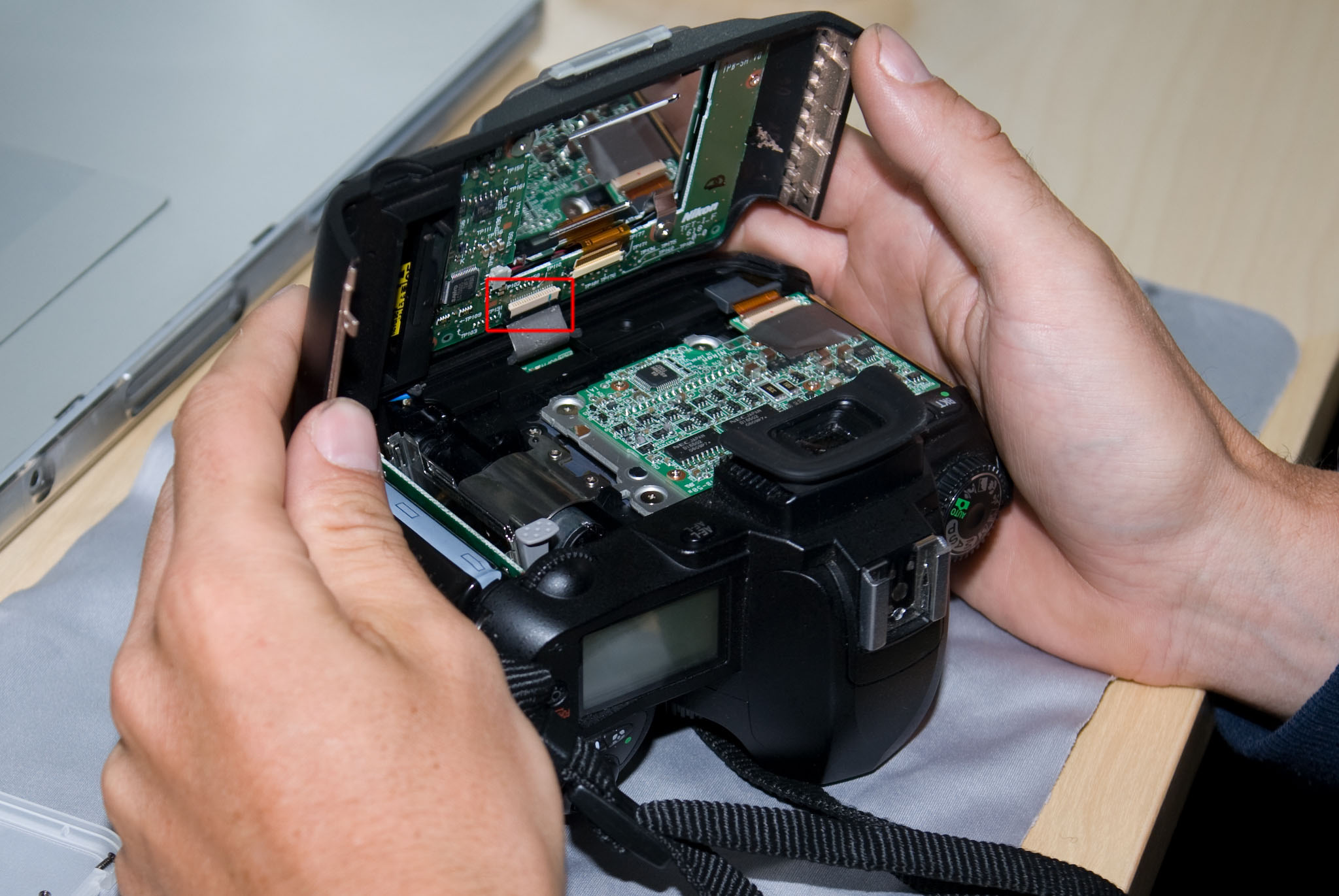
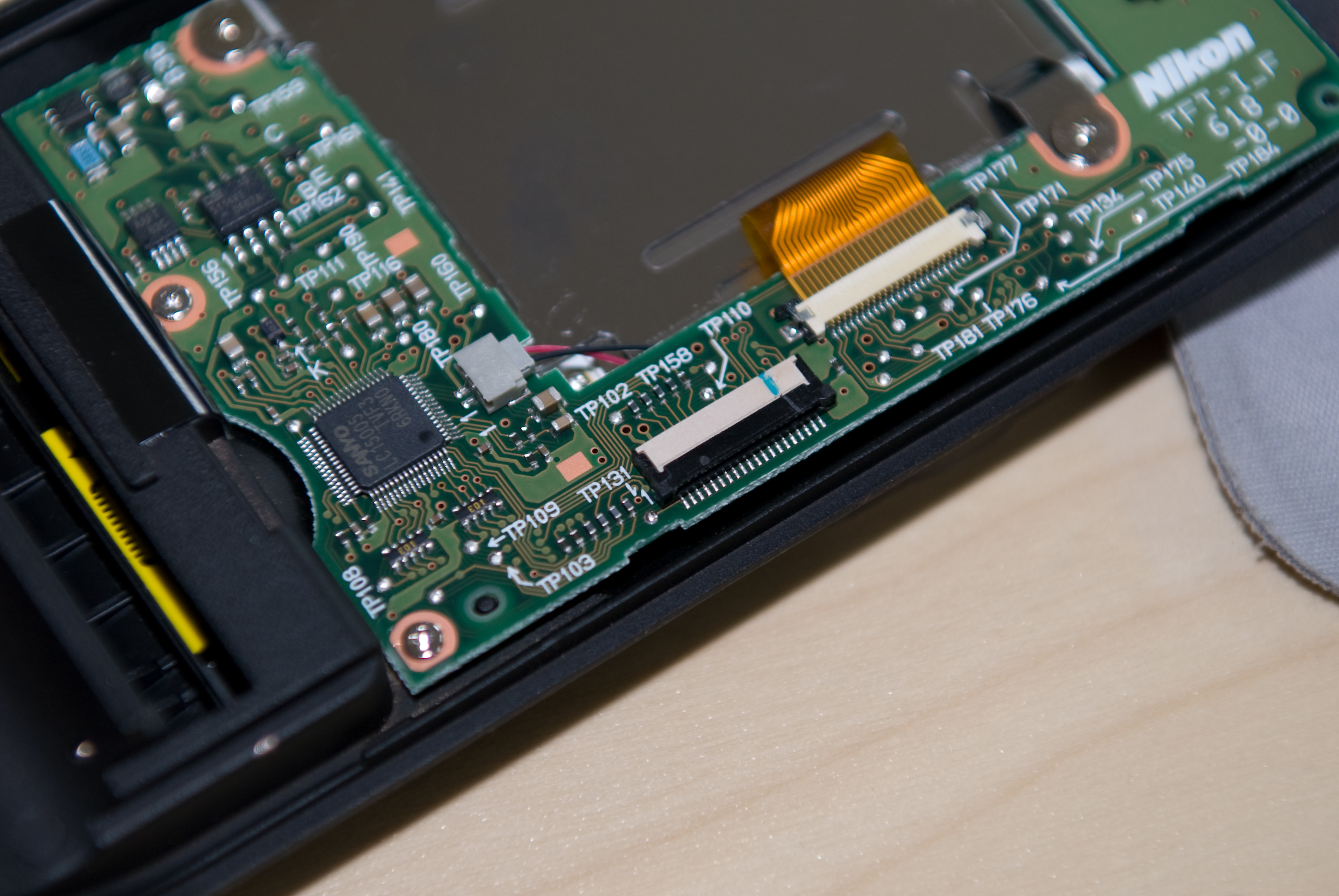
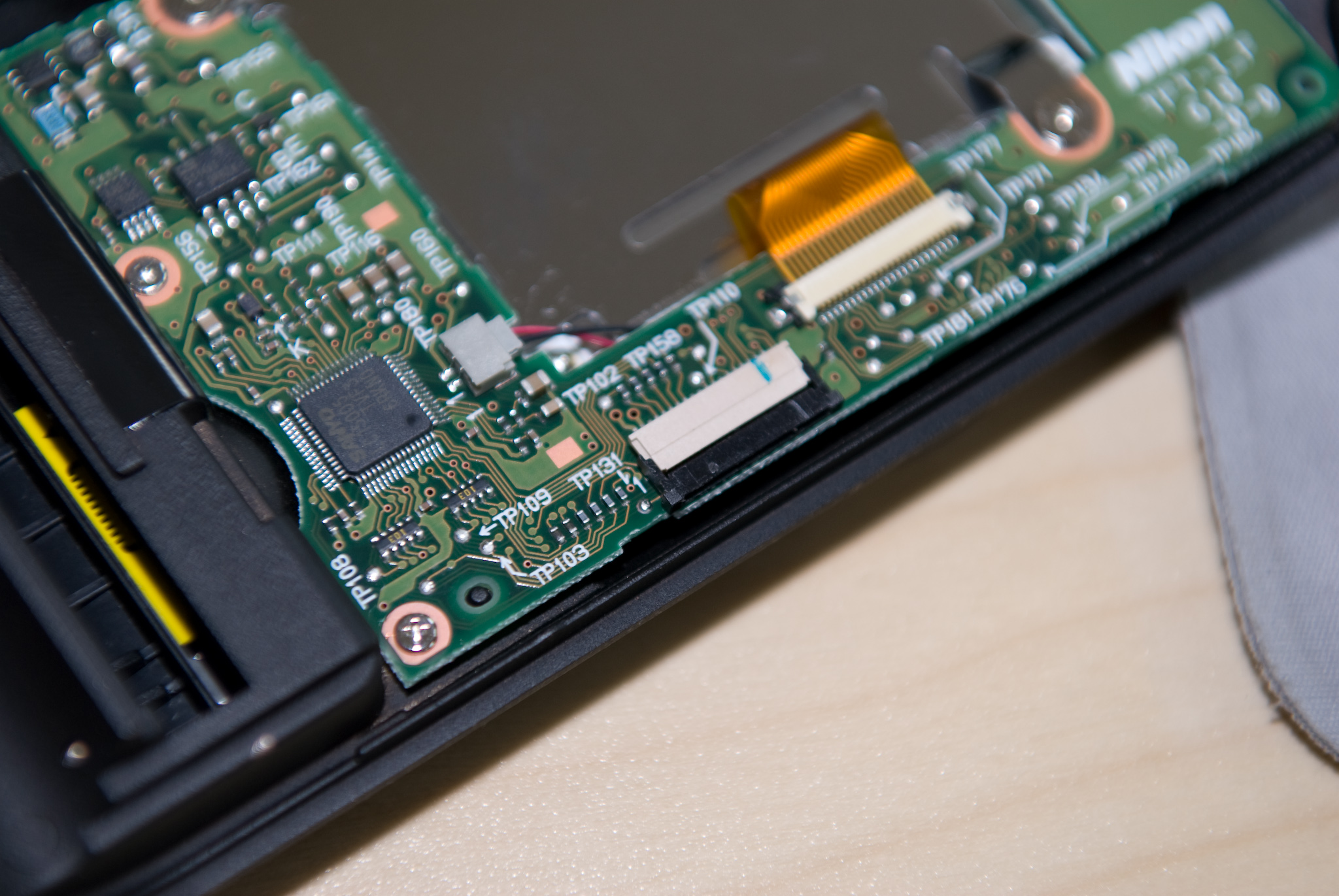
To disconnect this cable, carefully slide the black part of the connector downwards, towards the cable. The best way to do this is by using the tweezers on the side parts of the connector.
This is what the connector looks like when closed:
And here it is open:
Set the back panel aside in a safe place.
Step 2: Bottom panel removal
The bottom panel is held in place by 8 screws. Some of them have different sizes, so make sure you’ll know which one goes where when you put everything back together.
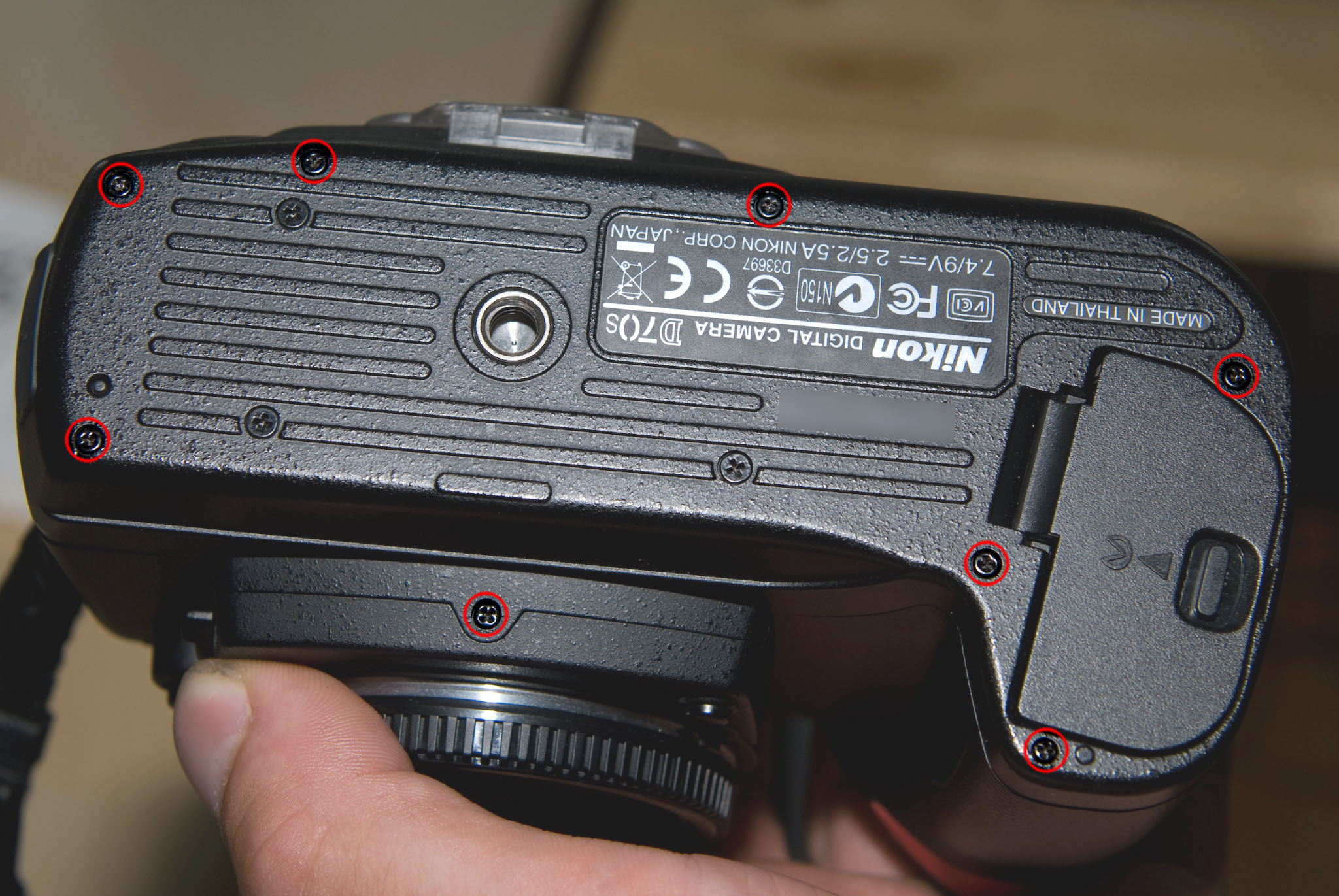
Now lift off the bottom panel. It doesn’t have any connectors, so it should come off quite easily.
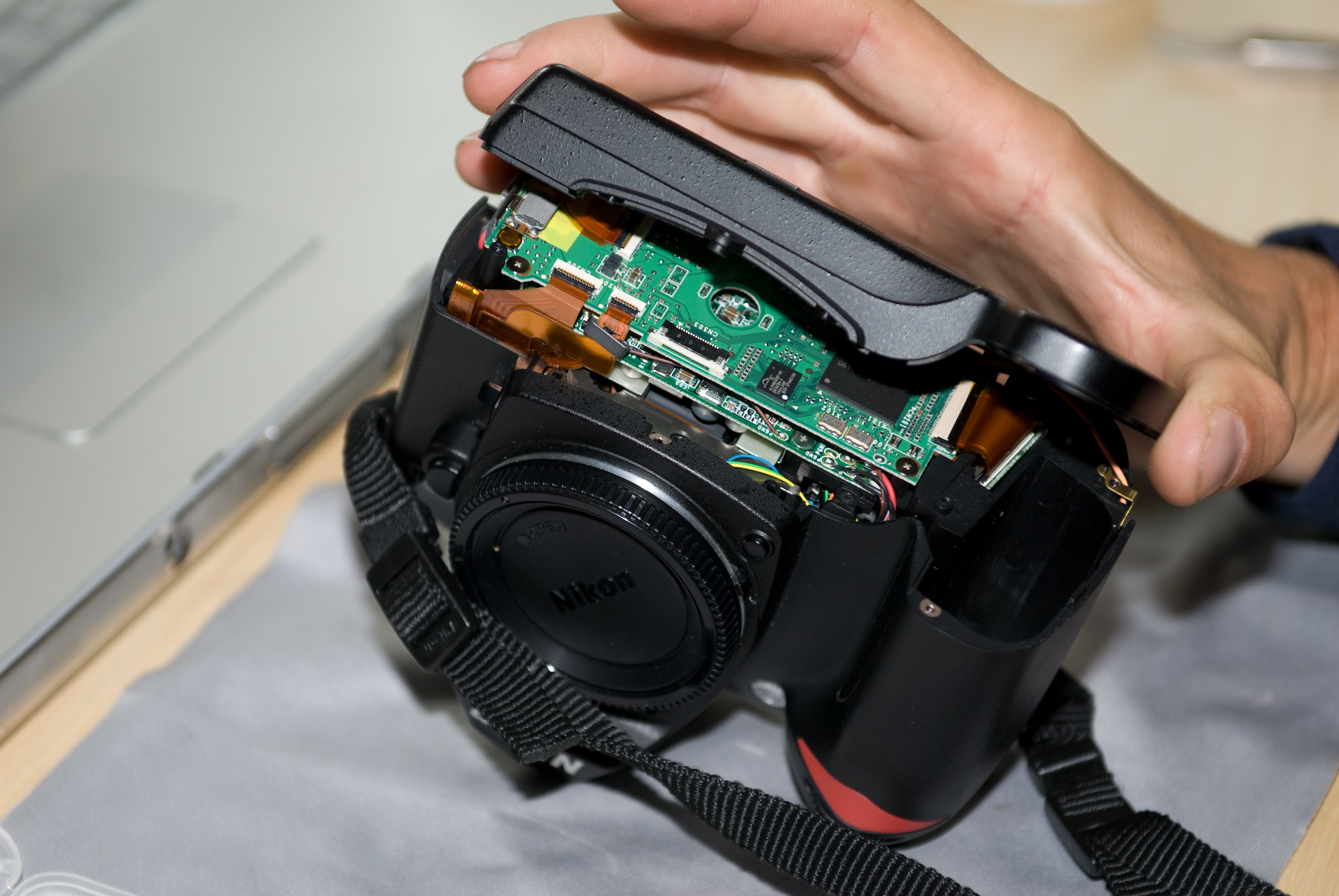
Step 3: CF Subpanel removal
The CF subpanel is connected to the rest of the camera through one ribbon cable. Unlike the back panel, this connector has a black flap to hold the ribbon in place. Gently flip the black part up to release the cable, and then pull it out of the connector.
Next, remove the two sliver screws holding the subpanel in place.
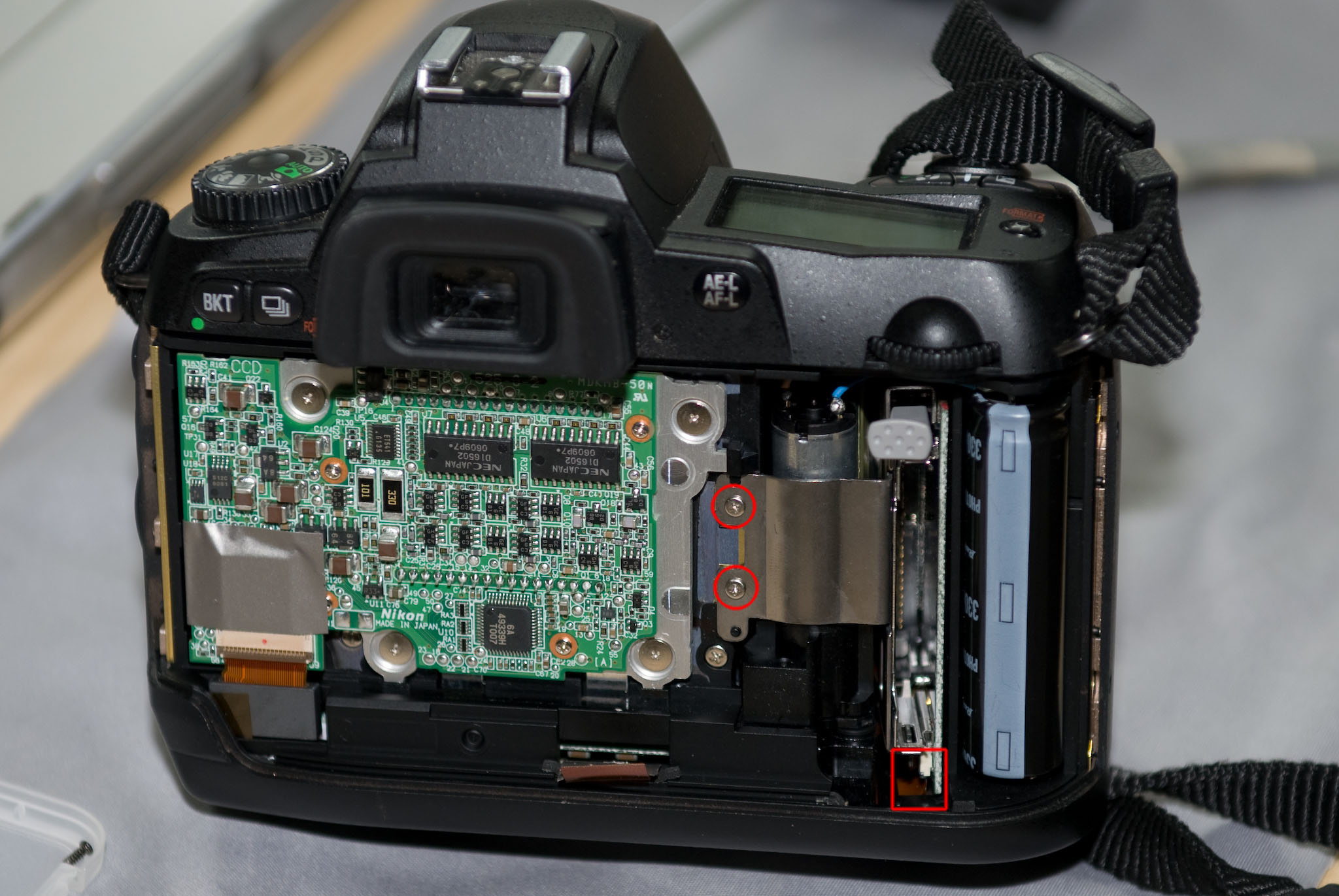
Pull out the CF subpanel, it should come off very easily. Note that there is a small copper sheet below the bracket that held it in place, do not lose or damage this part.
Step 4: Fixing the pins
Now that you have direct access to the reverse side of the CF receptable, use the tip of very fine tweezers – or a very small screwdriver – to push the pins back into arrangement. Here is the bottom part after realigning:
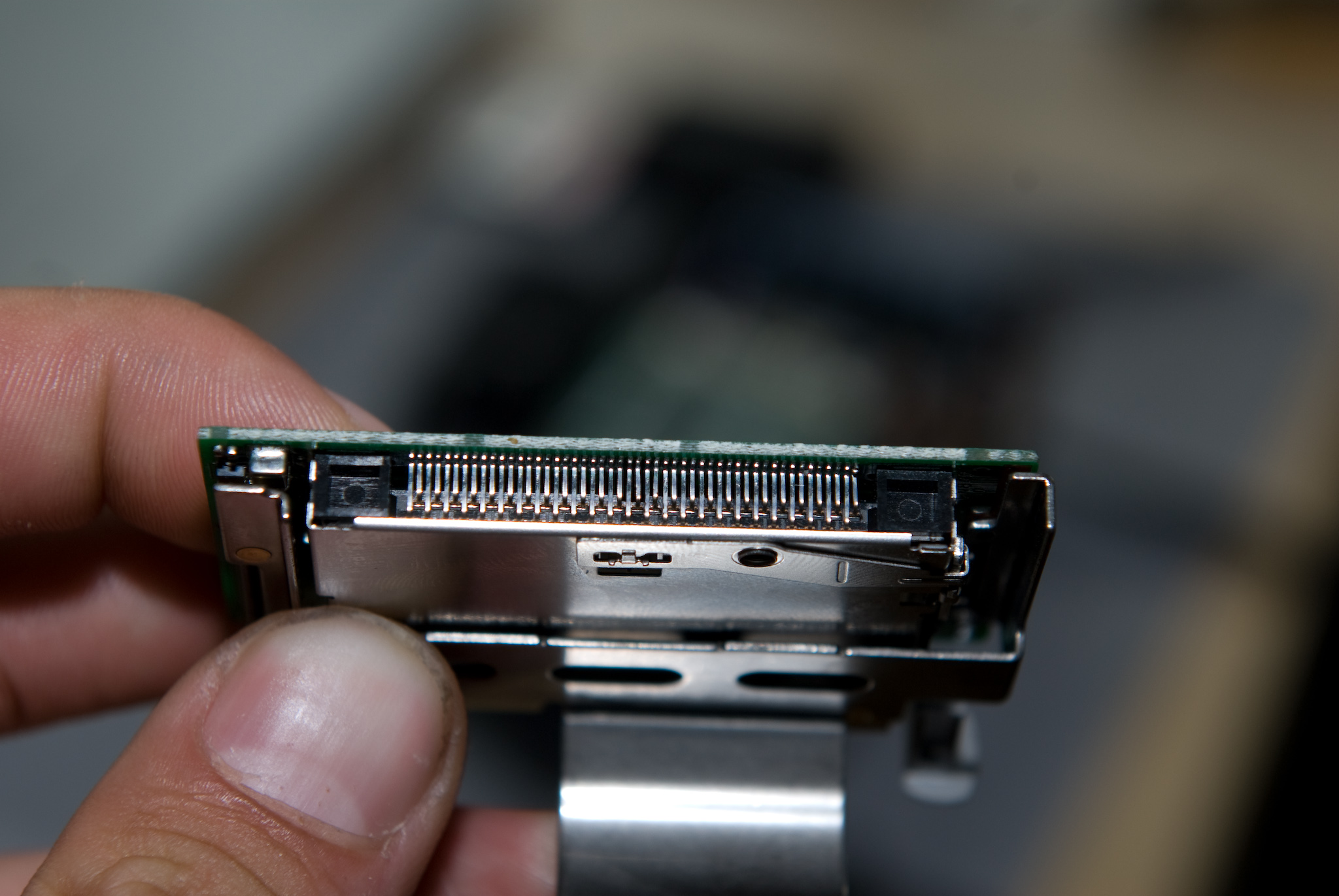
It is also much easier to straighten any bent pins with the subpanel removed.
Step 5: Testing and reassembly
once you are confident that the CF receptable works (try it with a CF card), put it back in place. If it doesn’t slide into its position easily, there is a cable at the bottom that may be getting in the way. Don’t force it.
Reconnect the CF subpanel. Make sure the black flap on the connector is ‘up’, then slide the ribbon fully into the connector and close the flap. Take your time, if you damage the ribbon you’ve converted your almost-repaired camera into a paperweight.
Replace the silver screws. Did you take care of that copper sheet?
Reconnect the back panel. This takes a lot of patience, because there isn’t much room to work with and the sliding connector is a bit of a pain without expert tools. Make sure the black locking part of the connector is ‘open’, slide the cable fully into the connector, and use tweezers to push the cable as well as the lock into the base of the connector. Again, don’t rush. This can take a while.
Now the camera is sufficiently connected for testing. Put the back panel back in place, and insert a CF card and a battery. You’ll have to hold the battery in place, but the camera should turn on and work as expected. Test all the buttons on the back panel. The first time I tried, the back panel connector was slightly misaligned and only the left/right part of the rocker switch didn’t work.
If all works well, turn the camera back off and screw the back panel in place.
Finally, replace the bottom panel. Make sure you’re using the right screws in each position.
Step 6: Go out and shoot great pics!
Comments
105 responses to “D70s Camera Repair How-To”
Patric B’s advice on this forum on 2008/11/24 was extremely helpful. He said to disconnect the bottom end of the back panel ribbon cable rather than the back end. To do this, wait until you have the bottom panel removed before removing the back panel. As Patric said, the ribbon cable socket of the bottom end uses a very different locking principle. Instead of sliding, the black clamp pivots 90 degrees open like a piano hinge. Lift the edge of the black clamp (cable side) with a sharp screwdriver, but DO NOT touch the ribbon cable itself, or the contacts will get gouged! When the clamp is rotated 90 degrees, the cable pulls out free. This is much easier and safer than disconnecting the cable at the back panel, but the cable and socket clamps are very delicate. Thank you Stephan and others for taking the time to share things learned.
James
thanks for all i’m a camerounian’s camera operator but i have a lot of camera who is damage but no spare parts to change ,can you help me to show me where i can buy aspare part?
you can buy the part at
http://www.micro-tools.de
part no: NIK-D70-CF-READER
1C998-364
Thank you for the excellent instructions. Just reassembled my D70s and the CHA-problem seems to be gone.
I didn’t find any pushed back pins or anything alike though.
Be aware that the pins are of different length by specification! That is the upper left and bottom right pin are shorter, the bottom left, upper right and two pins in the middle are longer than the rest of the pins.
I cleaned the ribbon cable contacts with a clean q-tip. Maybe that helped.
Also I zero filled my CF-cards with the Unix/linux tool dd:
dd if=/dev/zero of=/dev/sdb bs=4k
where /dev/sdb is the path to the cf-card device which may be different on your computer. Run “dmesg | less” to find the device name of your card. You can run Linux off a bootable CD to do that.
After that I formatted the cards in the camera.
Just shot 4GB worth of images without any troubles. Nice! 🙂
Thanks for the detailed instructions and photos. They made the job very easy. Unfortunately, after taking it all apart, cleaning, checking and re-assembling, there is no improvement. I guess I will have to break down and buy a new reader module but at least I know that installing it is a snap. Thanks again.
Thanks for great instructions. Followed them easily. Of course reconnecting the back panel is a little tricky.
Not trusting my ability to fix the existing CF card reader, I purchased one ahead of time – I was able to buy a replacement CF card reader from Nikon USA for about USD 10 plus $6-8 shipping. I think this was a worthwhile price to pay to ensure that the problem didn’t recur and that I only had to do this operation once.
Thanks again
Could you please tell me how you ordered the card reader part from Nikon USA? I could not find a way to order online. Did you call customer service?
Thanks!
Hi Simeon. I carried out some checks and the only information I could find was this.
Nikon Parts Department
Phone: 310-414-8107
FAX: 310-322-6979
7am – 3pm (PST)
Monday – Friday
Very happy. Replaced the CF reader no problem other than that awkward ribbon connector on the back panel which took a while. Many thanks for the detailed instructions.
[…] have the tools, the confidence, and the mechanical aptitude, it might even be something you could try yourself. But even having it repaired by a camera technician, it wouldn't be that expensive. Has it been 8 […]
Hi!
According to the experience of the ones who made the repair :
Did the CHA-problem definitly go after you made the repair or did it come back latter ?
Thank you so much (and sorry for my bad English: I’m french …!!!)
My problem definitely disappeared after changing the reader. The camera works perfectly again.
Great instructions – 2 pins were bent on mine too and I was only able to see it once the CL reader module was out. Unfortunately repositioning the pins is almost an impossible affair due to the lack of access space. I’m going to order a new reader.
In case anyone is still looking at this, talked with Nikon today, the part number is actually
1C998-634 (number transposed above). On backorder until end of April. I will look around to find. Thanks for the info though, my camera has been CHA for 9 months and I finally going with this solution. Considered upgrading, but don’t want to curb it. Thanks!
This a great source of information and confirms this as a common problem. For those not brave enough to attempt the repair then consider my comments below. I would suggest for those who will try to do this themselves they should probably buy a replacement card reader and flex as this is the most likely cause of the issue and so once open replace the card reader is the best advice
I’ll tell you my story as I wasn’t brave enough to try this. I had been getting the CHA and FOR issue on my D70 (its been converted to IR and nothing to do with this CHA issue). I found I could get past the issue by removing / reseating the card but its a pain doing this and who wants to do this everytime the camera is switched on.
My reasearch suggests its an issue with the gold plating on the camera SD card reader pins where the coating wears off and the pins oxides cause the poor contacts and hence the CHA issue.
I got several quotes, beware of shops claiming to do them as they will often just send them off themselves and add a cut on top. I wont advertise who I used to make the repair but feel free to email me if you want the details. Anyway the repair has cost me £78 inluding VAT, parts (new card reader and flex) and return delivery via courier. It has taken 5 days in total. This repair also included an internal clean and clean of the CCD sensor
Which ever you try do be aware its an easy fix and relatively inexpensive, do consider an internal dust rem,oval clean and CCD clean at the same time.
Good luck with which ever fix method you try!
I hav70 with CHA problem. It has finally reached the point that I cannot reset the camera by removing/inserting the card. The camera is dead with permanent CHA.
I am reluctant to attempt the disassembly of the camera myself.
I would like to send the camera to a trusted repair facility and pay them a fair price for the required service.
Can you please provide the name (contact info) of the firm that you used with successful results?
Thanks in advance,
Diehl Unger
diehlunger@charter.net
Great description! After some fiddling I could put my D70 back together again.
TIP: I found it easier to disconnect/reconnect the flatcable to the backpanel on the side of the bottom PCB (you will have to remove the bottom panel first). It is much better accessible and it flips open, just like the CF cable.
The only camera problem I could find was some dust between the soldering pins of the CF connector. I suspect the card problems to be caused by the flex-PCB’s / flatcables between the PCB’s. I cleaned them all using electronic cleaning solvent (Servisol Aero Klene 50) and reconnected them carefully.
I followed this very easily, thanks! It seems though that I have some corrosion on the cable that was taken out of the cf subpanel… anyone know if that would have caused the CHA error?
I ran across this site a few years ago and bookmarked it for the time when I decided that I’d try to fix my D70. I lost that bookmark and am so happy to find it with a search query. I’ve been using my D90 and let the D70 sit idle. Last week I took it to a Girl Scout meeting to talk to the girls about Digital Photography. When I removed the CF Card and reinstalled it, the old familiar “Card Not Formatted” error was displayed. Oh joy. So, I hope that this page helps me correct the issue.
Thanks for keeping this info available.
Thanks very much – removing the panels and cleaning the contacts cleared the problem.
Nikon is stating they do not sell parts directly anymore. Has anybody in the US found an option to get the card reader. Nikon quoted me $150 – $225 for the repair.
any chance with an idea of fixing my D70 that keeps showing FOR and the problem is not with the card???
thanks
Apparently this may also be caused by a malfunction of the card reader panel. A brief search turned up this discussion on flickr, where the original author mentions that they managed to fix their issue with a replacement.
I need de nikon d70-cf- reader p/n 1c998-634, where to buy it, other place then Nikon
Sorry, the only suggestion we can make is to check ebay… it should be fairly easy to find a seller there.
Great tutorial. Thought I’d chime in since it seems the card reader replacement part is becoming harder to find. I could not buy it from Nikon and buying one on ebay is likely to come from a donor camera that has the same CHA / FOR issues we are all experiencing. Plus they are now far more expensive than some report buying new Nikon replacements a few years ago.
I read on another site that the card reader may be repairable. He found that the force of the card going in and out in conjunction with poor manufacturing creates cold solder joints from the pins to the board. You can read more here:
http://votefordavid.blogspot.com/2012/12/solved-0-diy-nikon-d70-chachr-error-fix.html
I followed the instructions here to disassemble. Once apart I used an 8x slide loop to examine the pins. None were bent. I examined the solder joints form the pins to the board. They appeared to be well soldered but they are insanely tiny solder joints so its really hard to know for sure. Adding fresh solder to each pin without bridging to another sounded insane. I decided instead to simply heat each pin with a very sharp soldering iron to reflow the solder that was present. It was really difficult to tell how much of a change was happening.
After hitting each pin with the iron (for a 5 count) I looked for solder bridges or anything that may be connecting the pins electronically. I did notice some thread, hair or slivers of metal. They were microscopic. Thinking they could be a thin shaving from friction when sliding the card against the pins I cleared everything from the pins just in case. Last I took a sewing needle and ran the tip between each pin at the solder joint to make sure there was nothing touching. Also when reassembling I scraped the end of the ribbon connector to make sure there was no oxidation or connectivity issues.
I can’t be certain what it was specifically but this fixed my problem completely. Works like new. It took me about 45 minutes moving slowly.
If I got another one of these with the same issue (for those of you considering what to do) I think I would blow out the chamber really well before disassembling to make sure its not simply an errant sliver of metal bouncing around and connecting pins. The stuff I removed was smaller than the naked eye could see. It was smaller than a regular magnifying glass to see. I could only see it with an 8x loop. Second, I’d try to clean / lightly scuff the connection of the ribbon cable on the bottom (not the lcd cable but the card reader cable). It only requires removing the bottom cover. Next I’d do the full disassemble, take out the card reader and try to carefully reflow the solder on each pin to make sure they are all well connected. Last, if all these fail, I’d try to track down a new card reader fro a reputable place and simply install it as suggested.
Thanks for inspiring me to try to tackle this DIY. It’s fun when it works.
So I got that dreaded CHA message this week. I took out the card and I couldn’t rad anything from it. I put in another card and seems to be working. So the question is, can a CHA error come from the card and not the reader/camera?
That is certainly possible, as the CHA problem can also be a simple contact error (can be a bent pin, but also simply corroded contacts). So in marginal cases one card could fail while another one would provide sufficient electrical contact to work.
Is this a place where I might an answer to a problem involving the time it takes for the picture to take after pushing the button on my old D70? I could have sworn that it was almost instant, as without flash, when you hit it. That one of my pet peeves with little digital cameras. It takes forever, probably about 1-2 seconds. I reset the camera, no help.
Sorry, if it’s not something obvious (which you would have cleared out by resetting the camera), I’m pretty sure it would be hard to diagnose without having the camera in hand.
Nikon no longer supports repair of this error since the part is no longer available from them. Will try the cleaning and hope it does the trick. Many thanks for the instructions.
Can a D70S CF card reader be used in a D70?
I’m not entirely certain, but it could very well be possible.
AH, now I can understand the problem of cold solder joints.
Assuming I have read this right, the pins have to take a small load when the card is inserted in the CF slot.
SO, if the pins are slightly being displaced in the device then the eject mechanism is also putting a load
on the pins. so in effect is a push / pull motion going on in the CF slot, and the pins are moving ever so slightly in and out.
Thus the solder joint between the pins and the PCB starts to go….
This being the case then I suggest once the card is in the camera then leave it there! No taking out or putting in.
Just in case this does ever happen and a CHA comes up then try this.
Just ever so slightly, press the CF eject button to push out the card a small fraction out of the CF slot to reset the pins in the PCB effectively reseating the pins then hopefully this will close up the micro gap caused by the cold solder break.
All I can say is give this a try?
Problem started as an intermittent CHA error that turned into a ‘can’t read anything”. I took apart, did not see bent pins but did find dust. I put back together. Can now read card but the LCD screen is black.
any ideas.
Sounds like a minor glitch while putting it back together. The ribbon cables can be a bit tricky, make sure they are all seated correctly… good luck!
Debbie, just curious if you checked your cables and if so, did your screen get fixed? Mine is white after replacing the card slot…. I’m so frustrated.
thanks
Sounds like an issue with the flat ribbon cables. Make sure they are all seated correctly and not at an angle. Good luck!
Thanks to all here I no longer have a Nikon 70s boat anchor. As with others I was getting “CHA” and also “FOR” error codes intermittently. So following the guides here this is what I found. The CF card holder is very well made with gold plated pins which showed no problems. The weakest link had to be the ribbon cable and its connectors. There are only 2 screws where the CF card holder attaches to the camera. If you look carefully when installing or removing the memory card you can see a little movement of the CF card holder. The action of pushing to install and pushing to remove the CF memory card caused movement on the ribbon cable with its connector over time to intermittently make or lose contact. On the ribbon cable I lightly ran a pencil eraser over its contacts and then carefully align and reinstalled the cable. Now everything is back to normal using any of my other memory cards too. This was real easy to do. Only thing to buy would be a good set of tweezers.
I replaced my memory card slot and now my LCD screen is white… I’m not sure what to do? I bought the camera used and don’t really want to pour any more money into it… Just thought you might have a thought as to why the screen went white, or what to do to fix that? I read somewhere to hit the “reset” button, but can’t find one on mine???
thanks!
I followed all the instructions exactly, however once reassembled it would not turn on at all. What step in the process should I go back to and redo?
Probably all of them, that symptom is too unspecific to tell what’s exactly going on…
Followed the instructions and a few of the comments and was able to take a d70 (with a CF bent pin) plus another d70 (put out of commission after burning the shutter during a shooting of Venus transiting the sun) and make a working d70! I saw some water damage I had never known about on the latter, as well, which was enlightening.
In short, this post helped me because my newer camera (d3100) doesn’t autofocus some of my lenses, doesn’t work as a flash commander, and doesn’t have an IR sensor for use with remotes. My wife and I shoot as a team sometimes so I use the 3100 as a primary but love my d70 for special shoots or alternate views and didn’t have to replace it with a 80/90/7X00 just yet!
can someone explain how to take out the card reader from the body of the camera? d70s it appears that the subpanel and the small bracket even when pulled does not help
Hi there!
My D70s shows thé CHA error with 3 different cards, but looking carefully with a torch, I don’t see any bended pin, they are in fact all straight and well order (some seem higher than other, nothing else). Can it be something else ?
Very good tutorial, thank you very much for sharing !
Carlos
I have a used D70 that I bought dirt cheap a couple years ago and it has worked perfectly… until today… when I got the dreaded “THIS CARD CANNOT BE USED” error message. I am using a used CF card that I got in another camera. I tried to format the card a couple times in camera since this is what you see every article say to do, at least for modern camera. Still got the error message. Got home tonight, removed the card and looked in the card and slot but could not see anything obvious.
Then I removed the card and put in my CF card reader. Instantly, LR 5.7 opened up and showed a bunch of file names, but it would not show any previews. I looked at the card through windows explorer and could see the DCIM folder, which appeared empty. There was one file outside the folder, forget the name of it, but it was some Nikon text file, a few kb in size.
I decided what the heck, might as well try a full format while hooked to the computer through the card reader, against most recommend card formatting guides you see published today. Selected FAT and 32 in the next option below that and deselected the Quick format option, then let it do its thing.
When it finished, removed card from the card reader, put it in the camera and it took an image without any error messages showing up.
Great documentation of tearing down the camera and definitely would have used had I needed to… or if the formatting on the computer just turns out to be a fluke.